Therapy Documentation Software for ABA, Speech and OT Teams
TherapyCRM connects treatment plans, goal tracking, session observations and SOAP-style progress notes in one record, as therapy documentation software for ABA, speech and OT teams. It serves ABA, speech therapy, occupational therapy and physiotherapy teams in Canada outside Quebec, with controlled family sharing and home-practice logging.
Fictional worked example.
Keep Sessions Tied to the Plan Version
Versioned treatment plans preserve which goals and targets were in use for each session. Review the plan, source observations and related notes together before deciding whether to amend it. A later plan version does not change the goals recorded in an earlier session.
Choose measurements that suit the discipline and individual goal. A clinical record can organize observations, but it cannot establish improvement from an incomplete record or replace professional judgment.
Track Goals Alongside Their Source Observations
A therapy goal tracker is useful when a reviewer can find the goal definition, plan version and source sessions behind a chart.
- An ABA team may examine independent and prompted responses; speech and OT teams can use other goal-based measures.
- Keep the observation window, unit and scoring rule visible so unlike measures are not treated as comparable.
Review goal and plan analytics with the related notes, using branch and clinician filters where relevant.
- Missing or unsynchronized sessions need attention before a trend is interpreted.
- Clinicians decide what the pattern means and confirm mastery; a chart does not make that decision.
Write, Review and Publish SOAP-Style Notes
Write a SOAP-style note with Subjective, Objective, Assessment and Plan beside the client’s session record.
- Recorded observations provide context; the clinician writes and reviews the clinical account.
- The workflow separates a saved draft from the reviewed and published note.
When comparing progress notes software or a SOAP notes app, follow one fictional visit through the browser workflow on a tablet or computer.
- Check its plan version and observations, identify who reviews the note and confirm what is available to a guardian.
- Staff-only notes do not become family-facing progress simply because they were saved.
Worked example: compare like-for-like observations
A fictional review includes four independent responses from eight opportunities in one session, six from twelve in the next and eight from ten in a third.
- Those rates are 50%, 50% and 80%: the first two sessions have different response counts but the same proportion of independent responses.
- Keep the denominator and prompt definitions visible when discussing a trend.
Before interpreting the third session, check whether the target or plan version changed, whether the observations are complete and what the clinician documented.
- Bring this fictional sequence to a demo and ask how to trace a progress review back to its source sessions.
- The example illustrates record review, not evidence of treatment effectiveness or an automated clinical decision.
Review Progress Across a Multidisciplinary Team
An ABA target, a speech-language goal, a pediatric OT goal and a physiotherapy goal can call for different observations and documentation. Evaluate whether your team can keep each goal and its session context clear while coordinating scheduling and family communication around the same client.
In a software demo, ask a clinician to review a fictional goal, find its source session, read the related note and explain what is ready to share.
- Then ask an administrator to locate the attendance and funding information for that period.
- Keeping these records connected supports review; deciding what a trend means remains a clinical responsibility.
Give Guardians a Published Progress View
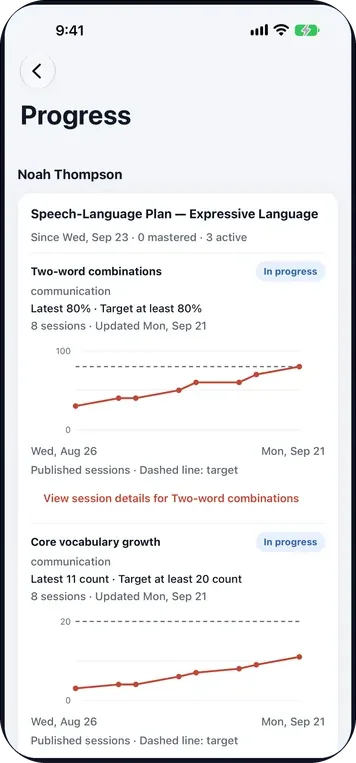
Invited guardians with clinical access can see family-facing goals and progress from published session documents in the browser portal or Family app. Staff-only notes and unapproved new draft goals are excluded from this progress view. Your practice sets access levels for each guardian’s link to a child; a saved staff record is not automatically a family report.
The portal also supports shared documents, forms and home-practice logging. Keep clinical observations, family-reported activities and administrative attendance distinct when discussing progress.
Prepare Funder Progress Reports
Funder progress reports bring together goals, session data and plan history for review. Staff can compare the report with the funding periods and usage recorded in the practice. Manual funding adjustments require a reason and retain their history.
The Ontario Autism Program profile changes the report label and title only. It is TherapyCRM’s own format, not a government form; review it against current funder requirements before sending. The product does not decide eligibility or submit insurance or government claims.
Product Limits
TherapyCRM serves English-language practices in Canada outside Quebec. It does not submit insurance or government claims, including Ontario Autism Program claims, and has no telehealth or video visits. Clinicians remain responsible for clinical decisions.
Frequently asked questions
Can teams track different goals on one client record?
Yes. Versioned treatment plans keep goals and targets tied to the sessions in which they were used. Clinicians decide which measures fit each goal.
Who sees progress updates?
Invited guardians need clinical access for the linked child to see family-facing goals and progress from published sessions. Staff-only notes and unapproved new draft goals are excluded from that progress view. The practice manages access levels; a saved staff note is not automatically a family-facing report.
Does TherapyCRM write clinical notes for clinicians?
Clinicians write and review SOAP-style progress notes from the session record. TherapyCRM does not make clinical decisions or replace professional judgment.
How do I choose the best SOAP notes app for a therapy clinic?
Test a fictional session from source observations through a SOAP-style note, reviewer approval and publication. Check whether goals and plan versions remain visible, who can amend or audit the note, and what families can see. Compare export and access controls against the clinic’s record policy. TherapyCRM has no telehealth or video visits and does not submit insurance or government claims.
Connect a guide, a resource and a clinic workflow
Read the explanation, try a fictional example, and review the corresponding product workflow. Browser tools and sheets do not send your entries to TherapyCRM.