Track OAP Funding Hours and Balances for Each Child
TherapyCRM keeps each child's Ontario Autism Program funding beside their treatment plan and sessions: approved hours and dollars for every funding period, what is used and what is left, and warnings before an authorization expires or a balance runs low. It is for Ontario clinics whose families pay invoices with OAP funding; families still report their own expenses to AccessOAP, and your clinic gives them the invoices, receipts and summary they need.
New to OAP funding? Read what it can pay for and what an invoice should show.
Set up each child's funding periods
Add the funding programs your clinic works with, then record each child's funding periods: approved dollars and hours, reference and authorization numbers, start and end dates and status.
- A child can have OAP funding, private pay and an insurer side by side, and several periods for the same program as long as their dates do not overlap.
- When a period ends, Start next period opens the next one with nothing used.
See what is used and what is left
Used dollars go up when an invoice that names the funding period is sent or shared, and come back off if that invoice is cancelled. Staff record used hours, and any correction, as an adjustment in whole hours with a reason; the adjustment history keeps the user, date and reason.
Warnings flag a period ending or an authorization expiring within 30 days, an expired authorization, a dollar or hours balance at 20% or less, and hours used beyond the approved hours.
- In a fictional example, a child has 120 approved hours and 12 recorded as used; staff find two hours missing from clinic records and add an adjustment of two hours with that reason, so the card shows 14 used of 120.
- Compare balances with your own records before relying on them.
Invoice families against a funding period
Link an invoice to one of the child's family-paid funding periods and it prints the program, reference number, period, authorization number and funded amount that your staff entered.
- The suggested funded amount leaves out lines your practice marked not eligible and lines dated outside the period, and an invoice cannot be sent if its funded amount is more than the period has left.
- Payments from families get numbered receipts.
Give families an OAP expense summary
For a family-paid funding period, TherapyCRM produces an OAP expense summary: a PDF listing each issued invoice in the period with service dates, number of sessions, expense category, clinician details, totals, funded amounts and receipt numbers.
- Lines marked not eligible or dated outside the period are listed separately.
- Staff and guardians with billing access can download it.
- It is TherapyCRM's own layout for the family's records, not a government form.
Prepare funder progress reports
Create a progress report for each child from goals, session data and plan history, choosing the OAP, insurer six-month or discharge profile.
- Authorized hours come from the treatment plan and delivered hours from sessions with approved documentation.
- Review, approve and publish the report, then print it or save it as a PDF.
- The OAP profile changes the report's label and title; it is TherapyCRM's own format.
Ontario Autism Program Core Clinical Services on One Record
Ontario Autism Program guidance lists ABA, speech-language pathology and occupational therapy among the core clinical services, and TherapyCRM runs all three in one account. Funding sits beside the schedule, the versioned plan and the session record, and families follow shared progress in the parent app.
Planning a new clinic or comparing tools
Starting an ABA clinic in Ontario means planning funding records and invoices before the first family arrives. The comparison of ABA software sold in Canada shows how other products describe OAP support on their own pages.
Funding Spreadsheet Versus TherapyCRM Funding Tracking
Both approaches depend on staff checking the source documents and keeping figures current.
Swipe or scroll sideways to view all table columns.
| Workflow | Spreadsheet | TherapyCRM |
|---|---|---|
| Approved amounts and hours | Staff maintain a file. | Staff record figures on each child’s funding period. |
| Used dollars | Staff copy invoice totals into the file. | Sending an invoice that names the period adds its funded amount; cancelling it takes the amount back off. |
| Changes | The clinic decides how to record edits and reasons. | Manual adjustments require a reason and are audited. |
| Progress reports | Staff prepare a report from clinic records. | A draft uses goals, session data and plan history for review before publication. |
What TherapyCRM doesn't do
It does not submit claims, invoices or expense reports to AccessOAP, the ministry or insurers.
Families report their own expenses, and TherapyCRM gives them invoices, numbered receipts and the OAP expense summary PDF.
Balances are staff-entered; there is no live feed from AccessOAP.
Sent invoices update used dollars, and every manual adjustment is kept with its reason.
It does not decide eligibility or apply OAP rules and fee caps.
Your practice marks each service as eligible, not eligible or needs a letter, and the suggested funded amount follows those settings.
Families do not see funding balances or hours in the portal or app.
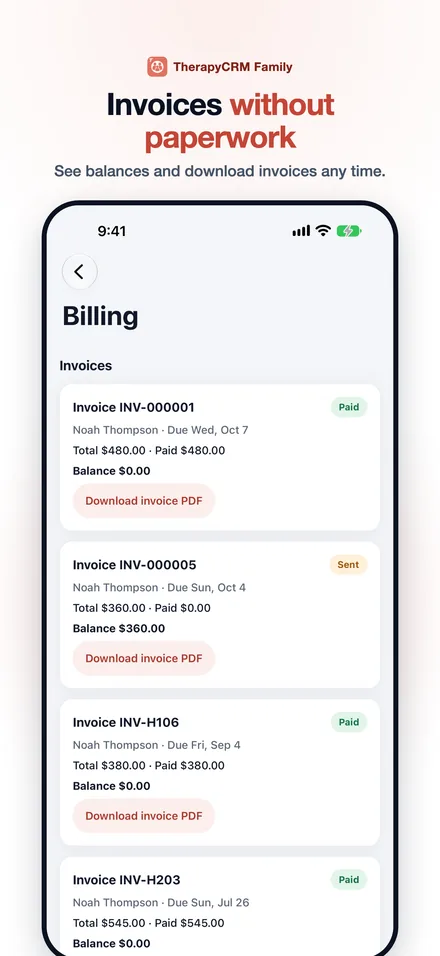
They see invoices, receipts and the OAP expense summary for their child.
It has no telehealth or video visits.
It is not available in Quebec, and it is in English only.
Common questions
Something not covered? Email support@therapycrm.io.
Does TherapyCRM submit claims to AccessOAP or the Ministry?
No. It records funding periods and balances, creates invoices and receipts, and produces the OAP expense summary and funder progress reports that your clinic and its families use.
Can we track other programs alongside OAP?
Yes. Funding programs are generic — a client can be enrolled in several (for example OAP, private pay and an insurer) and each is tracked separately.
Is the OAP profile a government-approved form?
No. It is TherapyCRM's own report profile and label for Ontario Autism Program funders. The OAP profile changes the report label and title only; it is not a government form. Clinics should review it against the funder's current requirements before sending.
Can families see their OAP balance in the app?
No. Families with billing access see invoices, receipts and the OAP expense summary in the Family app and portal. Funding balances and hours stay with your staff.
What happens when a funding period ends?
A warning appears 30 days before a period ends or an authorization expires. Start next period then opens the next period for the same program with nothing used.
Where is TherapyCRM available, and how does it support privacy?
TherapyCRM is available to practices in Canada outside Quebec. It provides role-based access, MFA, audit logging, short sessions, encryption and retention policies. TherapyCRM data is stored in Canada. Named exceptions: providers for email and text messages, payments, optional AI features, app notifications, bot checks, optional website analytics and video, and calendars a practice connects process limited data outside Canada, and rollback and testing copies are held in the United States and Germany. The subprocessor list names each provider and location. Privacy obligations depend on your practice, province, configuration and contracts. No certification is claimed. Security documentation and vendor terms are available on request.
Is there a free trial?
Yes. Every plan starts with a free trial; the exact trial length and terms are shown by the billing provider before you confirm checkout.
Connect a guide, a resource and a clinic workflow
Read the explanation, try a fictional example, and review the corresponding product workflow. Browser tools and sheets do not send your entries to TherapyCRM.
Run your next session in TherapyCRM
Start a free trial and explore the workflow with a fictional client before deciding.