Therapy Clinic Scheduling Software for Canada
Book recurring visits for ABA, speech-language pathology and OT, with physiotherapy as a supporting service. TherapyCRM checks clinicians, rooms and equipment across branches, and keeps waitlists, reminders and coordinator-reviewed family requests beside the schedule. It serves English-language clinics in Canada outside Quebec.
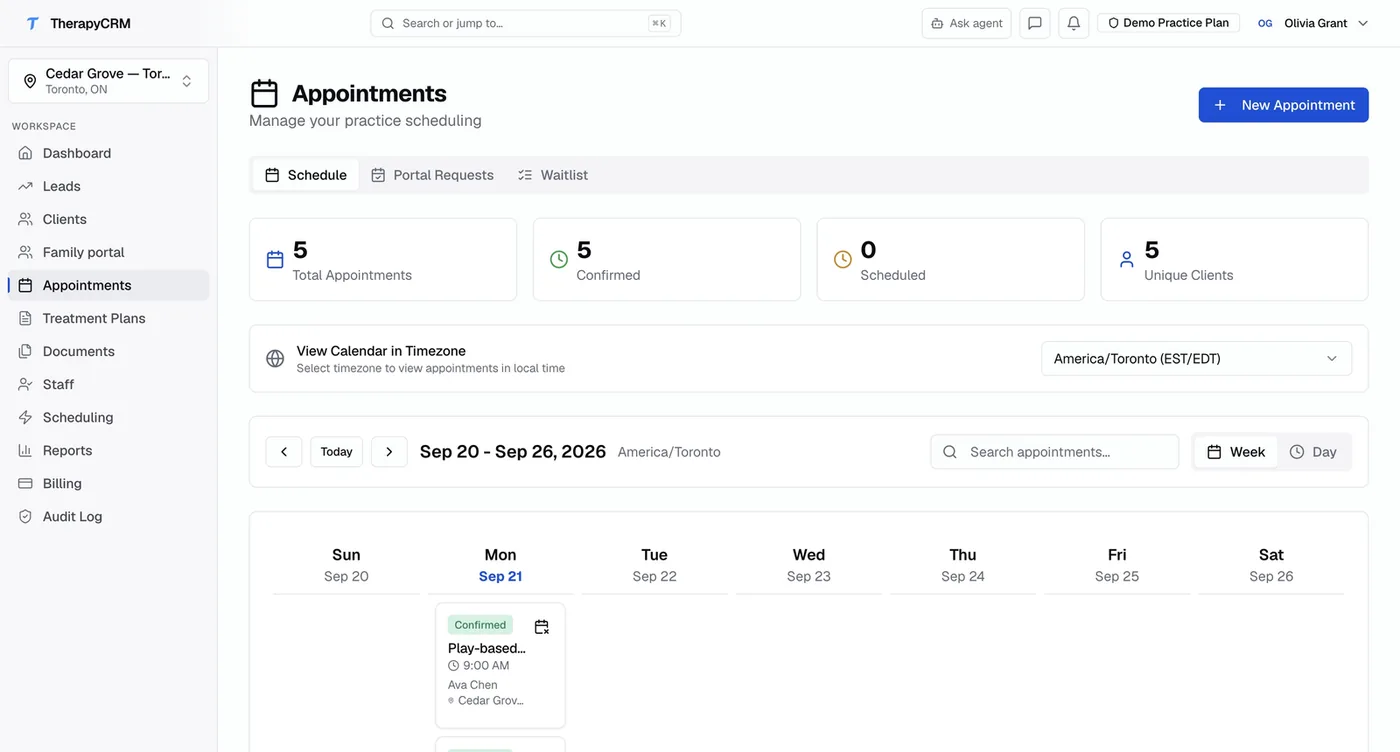
Schedule the Visit and Its Resources
Book clinicians, rooms and equipment together. A family request enters a queue; clinic staff check availability and confirm the visit.
Branches, Rooms & Equipment
Schedule visits by location, room and equipment. Assign a client to a specific room or piece of sensory gym equipment, and TherapyCRM checks for conflicts.
Staff Rotation Groups
Organize staff into rotation groups so the schedule can automatically assign the next available therapist, balancing caseloads across your team.
Recurring Appointments with Conflict Rules
Set up weekly or bi-weekly recurring appointments with automatic conflict detection. Room, equipment, and staff availability are checked before confirming.
Parent Portal Appointment Requests
Families can request appointment times through the parent portal. Requests enter a review queue, where a coordinator checks for conflicts and confirms resource availability before booking.
Email & SMS Reminders
Automated appointment reminders sent via email or SMS under your practice branding, with delivery tracking and logs.
Waitlist Management
Track clients waiting for openings, prioritize by date or clinical urgency, and match them with newly available slots.
From Coordinator to Clinician
The schedule supports the whole practice, not just the therapist's calendar.
| Role and focus | Workflow |
|---|---|
| CoordinatorResource planning and conflicts | Coordinators see branches, rooms, equipment and staff availability across locations. They review appointment requests from families, check for conflicts, and assign resources before confirming. |
| ClinicianDaily schedule and session flow | Clinicians see their schedule filtered to assigned clients and branches. From the appointment, they launch Session Runner to collect data and document progress. |
| FamiliesRequests, confirmations and reminders | Guardians request appointments through the portal, receive confirmations once approved, and get reminders before each session. Requests never bypass the coordinator's review. |
Patient Scheduling Software for a Shared Clinic Week
A coordinator books the client, clinician and treatment space together.
- Recurring appointment scheduling software needs to check each date, so TherapyCRM checks staff, room and equipment availability before a weekly or bi-weekly series is confirmed.
- Review a conflict and choose another slot before booking the visit.
From the appointment, clinicians open the session record in the web app.
- Therapist scheduling software should connect that daily schedule to session work, while invited guardians request times through a coordinator-reviewed queue.
- A request does not reserve a room or clinician.
ABA Therapy Scheduling Software Across Locations
For a recurring ABA caseload, assign the clinician, branch and shared treatment space before confirming each visit. ABA staff scheduling software also needs to account for staff rotations; the same calendar supports ABA, speech and OT visits when a team shares clients.
When evaluating autism therapy scheduling software, test a shared-room conflict and a change of branch using fictional appointments. TherapyCRM runs in a web browser, and coordinators review family requests before the visit is booked.
Appointment Reminder Software for Therapy Clinics
Send SMS appointment reminders or email reminders under your practice's branding and review their delivery logs. Check the timing, recipient and message wording with a fictional visit, including what happens after a coordinator changes its time.
Text appointment reminders for therapists are part of the same schedule as recurring bookings and family requests reviewed by a coordinator. During setup, test this patient reminder system so staff know which message a family will receive.
Waitlist Management Software for Clinic Openings
Keep clients waiting for a visit beside the schedule.
- Review a new opening against the client's needs and the available clinician, room and equipment before confirming a booking.
- In a demo, work through a cancellation and a waitlist opening with fictional clients; the coordinator remains responsible for the booking decision.
What Scheduling Does Not Include
TherapyCRM does not include telehealth or video visits, insurance eligibility checks, or insurance and government claim submission. It serves English-language practices in Canada outside Quebec.
ABA Clinic Schedule Example
In a fictional two-room ABA clinic, morning one-to-one sessions use separate rooms.
- An OT visit and an ABA visit both request the shared sensory room at 3 p.m.
- The coordinator checks the room, equipment and clinicians, then moves one visit before confirming either booking.
- Staff rotate between two branches, and a recurring parent meeting needs the same conflict checks on each date.
A guardian's portal request enters a review queue and does not reserve an appointment. In a demo, test this fictional week, a branch change, a waitlist opening and the reminders families receive after confirmation.
Common questions
Something not covered? Email support@therapycrm.io.
How do I choose the best ABA scheduling software for a multi-location clinic?
Test a recurring ABA schedule across branches with fictional clients, staff rotations and shared rooms or equipment. Check how conflicts are shown before confirmation, how coordinators review family requests, and how reminders follow changes. Trace a completed appointment into its session record and invoice workflow. Ask vendors about telehealth and claim submission if those are required; TherapyCRM includes neither.
Can we schedule across multiple branches?
Yes. The schedule supports multi-location practices. Each branch has its own rooms and equipment, and staff can be assigned to multiple locations.
How do rotation groups work?
Rotation groups let you organize staff so the system can auto-assign appointments to the next available therapist in rotation, balancing caseloads and distributing new clients fairly.
Do appointment requests from families bypass the coordinator?
No. All appointment requests from the parent portal go into a coordinator-reviewed queue. The coordinator checks for conflicts, assigns resources, and confirms before the family sees a scheduled appointment.
Can we set up recurring appointments?
Yes. Recurring appointments can be set up on a weekly or bi-weekly basis. The system checks for room, equipment, and staff conflicts before confirming each occurrence.
Where is TherapyCRM available, and how does it support privacy?
TherapyCRM is available to practices in Canada outside Quebec. It provides role-based access, MFA, audit logging, short sessions, encryption and retention policies. TherapyCRM data is stored in Canada. Named exceptions: providers for email and text messages, payments, optional AI features, app notifications, bot checks, optional website analytics and video, and calendars a practice connects process limited data outside Canada, and rollback and testing copies are held in the United States and Germany. The subprocessor list names each provider and location. Privacy obligations depend on your practice, province, configuration and contracts. No certification is claimed. Security documentation and vendor terms are available on request.
What service limits should a clinic check?
TherapyCRM serves English-language practices in Canada outside Quebec. It does not submit insurance or government claims, including Ontario Autism Program claims, and has no telehealth or video visits. It keeps a clinical record but is not a physician EMR and holds no EMR certification.
Is there a free trial?
Yes. Every plan starts with a free trial; the exact trial length and terms are shown by the billing provider before you confirm checkout.
Connect a guide, a resource and a clinic workflow
Read the explanation, try a fictional example, and review the corresponding product workflow. Browser tools and sheets do not send your entries to TherapyCRM.
Run your next session in TherapyCRM
Start a free trial and explore the workflow with a fictional client before deciding.