For Canadian practices outside Quebec
ABA Data Collection Software for Trial-by-Trial Session Data
TherapyCRM’s Session Runner records each trial outcome and prompt level against the active treatment plan, so ABA data collection stays tied to the plan version. Clinicians work in the TherapyCRM web app on a tablet or computer, with encrypted drafts during interrupted connectivity and synchronization when the connection returns. For English-language ABA clinics in Canada outside Quebec.
Fictional worked example.
Start with the treatment plan
Create goals and targets in a versioned treatment plan. Define the measurement, prompt hierarchy and mastery criteria before collecting observations. Each session stays linked to the plan version it ran against; clinicians choose the targets and interpret the results.
ABA Therapy Data Collection Software in the Session
Follow one fictional target through the browser workflow. ABA data tracking software needs to preserve the target, opportunities and prompts behind each recorded result.
- Open the planned session and select an active target.
- Record each trial outcome and the prompt level used, then review the observations and note.
- If connectivity drops, reconnect and confirm that the encrypted draft synchronizes once before clearing or handing over the device.
Offline trial-by-trial recording, step by step
This fictional walkthrough follows one session through a short connection loss. It is a prepared-session workflow: sign in and load Session Runner while connected, then keep the loaded page open. It is not a promise that the whole application can start or run offline.
- While connected, sign in to the web app, open the fictional client’s active treatment plan and start the planned session. Wait for the plan and collection sheets to load.
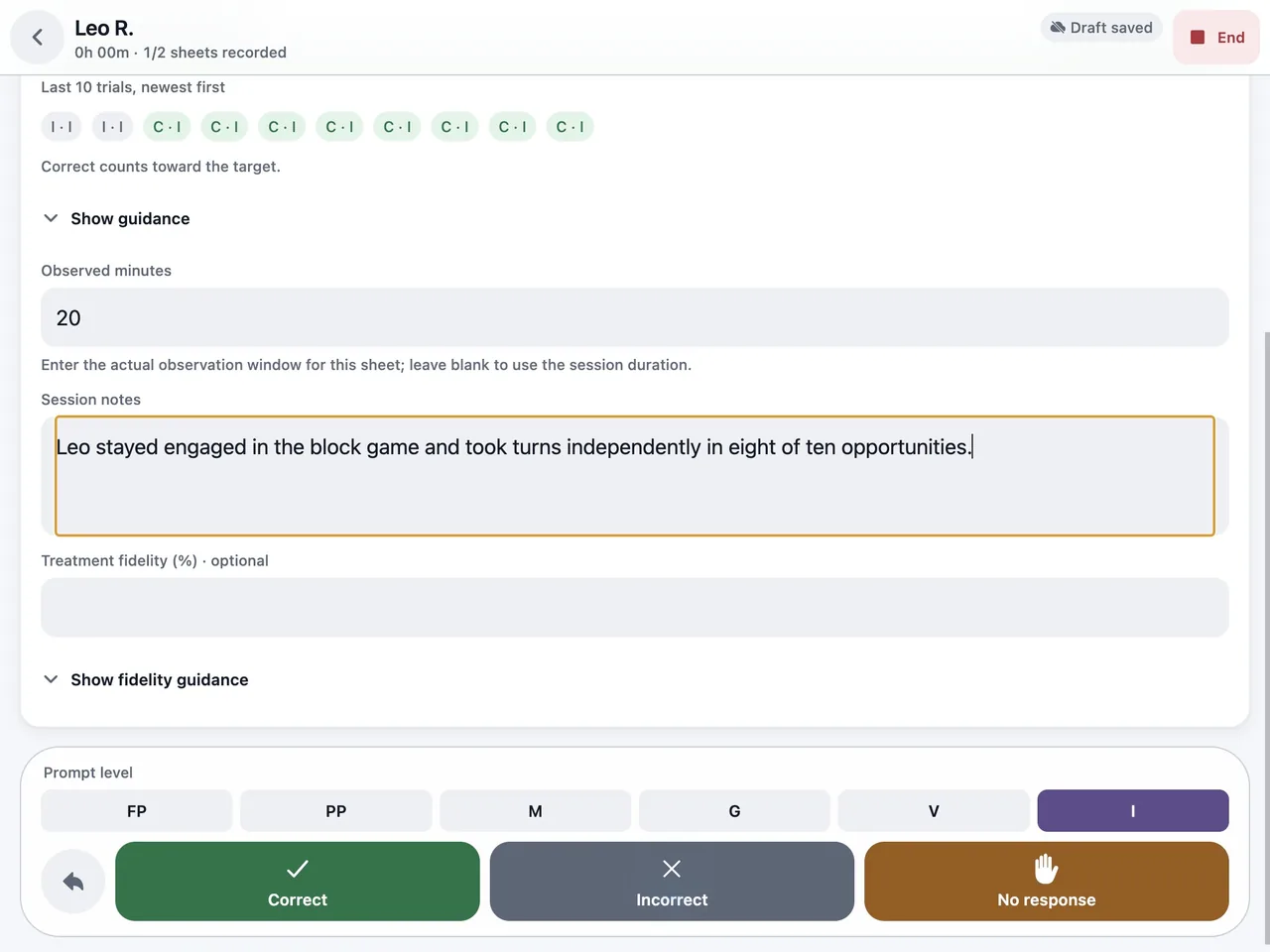
- Select an active target and record each trial as correct, incorrect or no response, with the prompt level used.
- When the connection drops, Session Runner keeps an encrypted draft on the device.
- Keep recording trials and prompt levels on the same loaded page.
- Select End session to review the collected sheets and note, then select Save session. Saving queues the session on the device for synchronization; keep the same device and browser available until it syncs.
- Reconnect with Session Runner open for that plan, because synchronization runs only while it is open, and select Sync now or Try synchronization. Replay-safe receipts stop the same session being saved twice. If a queued session asks you to sign in again, reports a conflict or shows Session protected — review needed, resolve it there; the device copy is retained.
- Confirm that the session has synced and appears in the practice record before you clear or hand over the device. A device-save message alone is not confirmation.
Types of ABA Data Collection Methods
Common types of data collection in ABA include frequency counts, duration measures, interval recording and trial-by-trial observations. A fictional target might count each independent response across ten opportunities and record the prompt used on every trial. TherapyCRM Session Runner records trials and prompts; frequency, duration and interval methods need a separate workflow. The supervising clinician chooses the method and scoring rule for each goal. The discrete trial data sheet linked below shows a copyable paper example, not a prescribed clinical method.
Worked example: keep independent and prompted responses separate
In a fictional ten-trial session, a clinician records six independent responses, three responses with a prompt and one incorrect response.
- The independent response rate is 6 ÷ 10 = 60%.
- Combining the prompted responses with the independent responses would give 90%, but would answer a different question.
- Agree on the target definition and how to score each response before collecting data.
Record the prompt used on each applicable trial and review the session note for context.
- A later session is comparable only if the target, scoring rules and opportunities are comparable.
- This is an arithmetic example for a demo, not a mastery rule, a clinical recommendation or a reported TherapyCRM customer result.
Connect data to documentation and billing
Teams comparing ABA graphing software can review condition charts across sessions alongside the source trial data and session documentation. SOAP-style progress notes move through review and publication. Invoices generated from completed sessions require approved documentation and a service code. Manual invoices skip this documentation check.
For Ontario practices, funding tracking records approved hours and amounts, with used and remaining balances. Funder progress reports include an Ontario Autism Program profile that changes the label and title only. TherapyCRM does not submit OAP claims or determine programme eligibility.
Evaluate the full ABA data collection workflow
When comparing ABA data collection apps, ask your clinicians to try the actual recording screen with a fictional target and scoring rule. Test an interrupted connection and confirm synchronization, then have a reviewer trace a chart to its source trials and plan version.
Check who reviews the note, what invited guardians can see and how a plan amendment affects the next session. Ask about device access and recovery before using real client information.
Product Limits
TherapyCRM serves English-language practices in Canada outside Quebec. It does not submit insurance or government claims, including Ontario Autism Program claims, and has no telehealth or video visits. Clinicians choose measurement methods and interpret the recorded data.
Frequently asked questions
Does ABA data collection work offline?
Session Runner keeps an encrypted draft on the device while offline and synchronizes when a connection returns. Staff should check the synchronization status before relying on the record.
What does Session Runner record?
It records trial outcomes, prompt levels and notes against active targets. Frequency, duration and interval methods need a separate workflow; the clinician chooses how to measure a goal.
Is TherapyCRM an ABA data collection app for RBTs?
Yes, but not a separate install. Session Runner is the ABA data collection app inside the TherapyCRM web app: RBTs and BCBAs open it in a browser on a tablet or computer, and a prepared session keeps recording through an interrupted connection, then syncs when the connection returns.
How do I choose the best ABA data collection software for trial-by-trial recording?
Give clinicians a fictional target and scoring rule, then record independent responses, prompts and errors across trials. Check whether each observation stays linked to the treatment plan version and whether a reviewer can inspect the source data behind a chart. Test an interrupted connection and confirm that the draft synchronizes once. TherapyCRM uses a browser workflow; its recorded data still requires clinical interpretation.
Why is data collection important in ABA?
Recorded observations let clinicians review responses, prompts and progress against a goal over time. The team can check the source session and plan version before changing a program or sharing an update with a family. Clinical interpretation remains with qualified clinicians.
Connect a guide, a resource and a clinic workflow
Read the explanation, try a fictional example, and review the corresponding product workflow. Browser tools and sheets do not send your entries to TherapyCRM.