
TherapyCRM Family
iPhone and iPad
Parent and client portal for therapy: TherapyCRM Family
TherapyCRM Family gives invited parents and guardians a browser portal and a free app for iPhone and iPad. Both connect to the family account created by the clinic’s invitation. See linked children’s visits and messages, plus the clinical information and billing your practice permits you to access. It supports ABA, speech-language pathology, occupational therapy and physiotherapy families at English-language practices in Canada outside Quebec. An active TherapyCRM practice account is required.

On the App Store for iPhone and iPad
Screens from the app
Screens from a fictional demo practice.
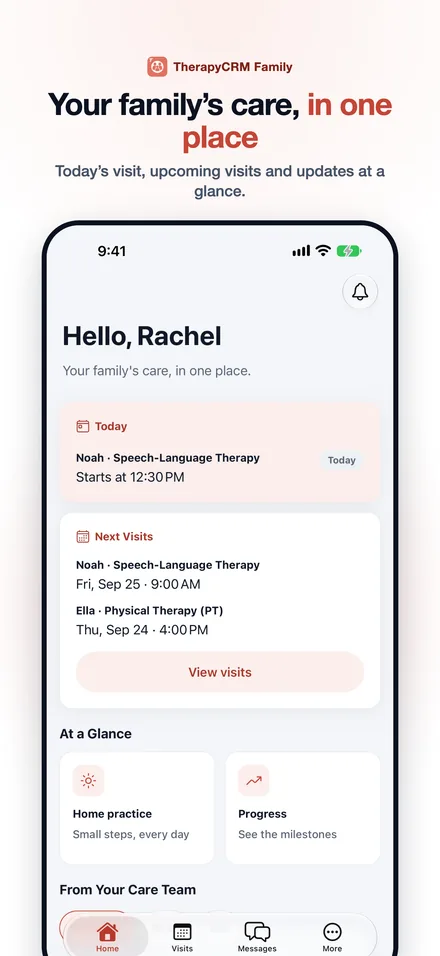
Parent portal software for therapy clinics
For clinic staff: open the child’s Communications tab and Portal access card to invite a guardian. Review the guardian’s email, child link and access settings before sending the invitation. Each guardian can have different permissions for each linked child.
Clinical access covers published care updates, home practice, shared documents, assigned forms and family progress. Photos & video access permits media in those updates. Billing access covers shared invoices, receipts, payment plans and packages. Scheduling access permits visit requests, unavailable dates and requests to move or cancel a visit. Visits, attendance and secure messages remain available to an active guardian linked to the child, even when those four levels are off.
Staff can update the access levels, unlink a guardian from one child or disable the guardian’s whole portal sign-in. The guardian-access help article walks through the invitation and these controls.
Families: join your clinic’s parent portal
Open the practice’s invitation link, check the invited email address, set a password and accept the Privacy Policy and Terms of Service. Then sign in to the browser portal, or download TherapyCRM Family for iPhone or iPad and use the same account.
If the invitation is missing or expired, ask the practice to send a new one. If a child or section is missing after sign-in, ask the practice to check your link and permissions. TherapyCRM support cannot grant access to a family account.
Visits and attendance
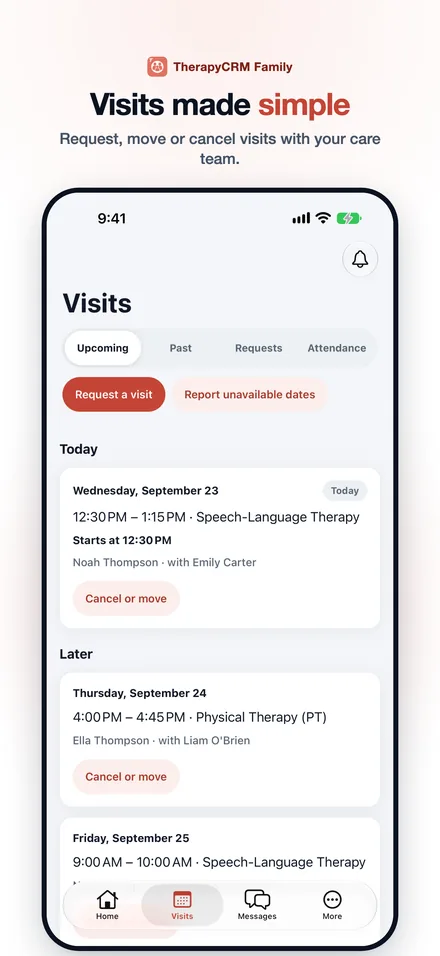
Browse upcoming and past visits for each linked child and review recorded attendance, including arrival and pickup times. Today’s visit can show checked in, in session, ready for pickup or picked up as the practice records attendance.
With scheduling access, request a visit, ask to move or cancel one, or report dates when the child is unavailable. Your care team reviews these requests. Sending a request does not confirm a booking or change a scheduled visit; check its decision in the Requests view.
Messages and care updates
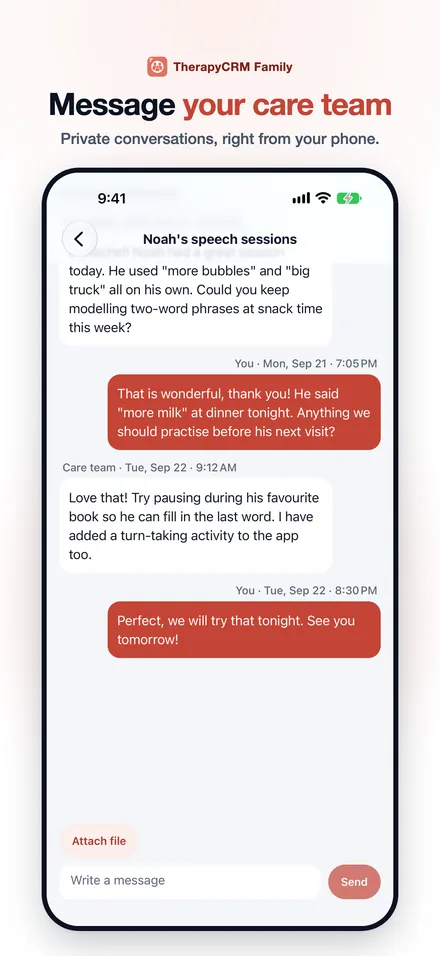
Send secure messages and file attachments to the care team for a linked child. Your clinic can review guardian conversations in its messaging workflow. Practice announcements also appear in the family account.
With clinical access, read the care updates the team publishes and add comments and reactions. Seeing photos and videos in those updates also requires Photos & video access and the practice’s applicable consent checks.
Home practice and progress
With clinical access, open the home practice activities your clinician assigns, including instructions, materials and tips. Log what you tried, how it went and how difficult it was. This supports follow-up to clinician-led ABA parent training and other assigned activities between visits.
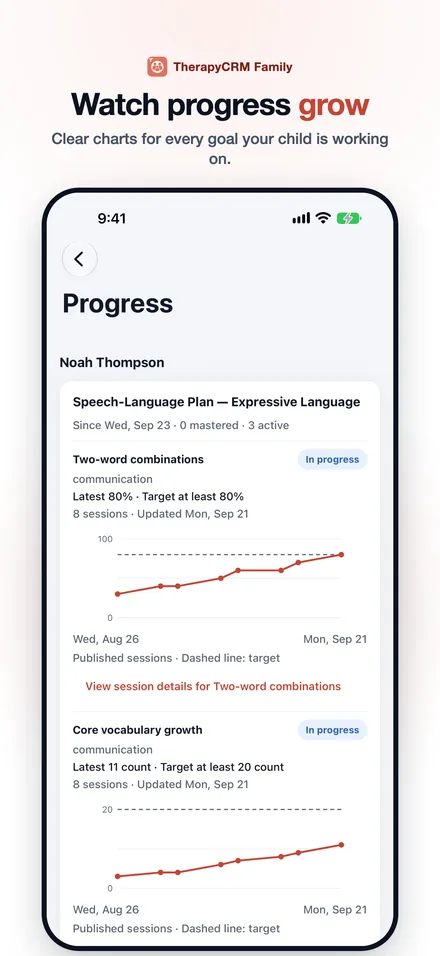
The Progress view shows family-facing plan goals and charts using published session data. Staff-only clinical notes and unapproved new draft goals are excluded. These charts show recorded progress; ask your clinician what the values mean for your child.
Forms, shared documents and billing
With clinical access, complete assigned forms, add attachments and sign documents the practice sends for your signature. Read shared documents and download their PDFs from the browser portal or Family app.
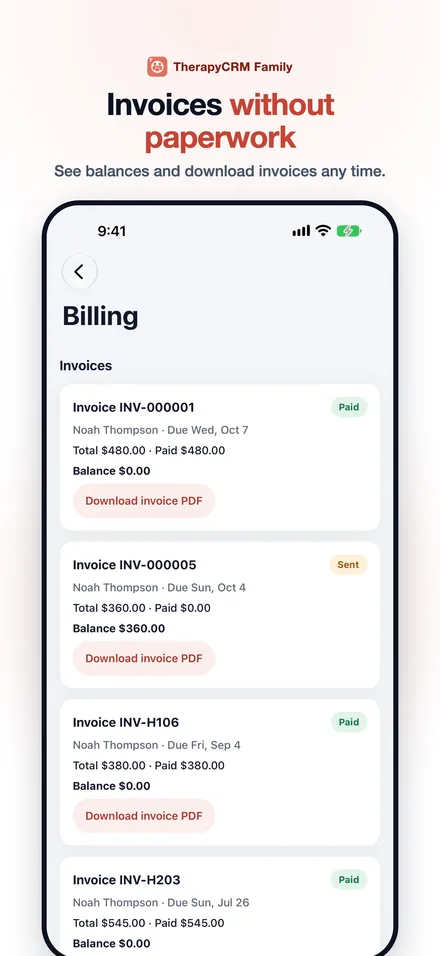
With billing access, view invoices the practice has sent or shared, download invoice PDFs and payment receipts, and review payment plans and session packages. Pay online appears for eligible invoice balances when your practice enables online payment. Checkout opens the payment processor’s page, where you enter card details. Ask the practice about an invoice, a payment option or a missing receipt.
Privacy and account access
The practice controls which children are linked to your guardian account and the access available for each one. In the iPhone and iPad app, a privacy cover hides content when the app is in the background, and you must sign in again after 15 minutes of inactivity. Use the support page for password, account and app help.
Availability and product limits
Invited families can use the portal in a browser; the published Family app is for iPhone and iPad. Family access shows information shared through the clinic’s account. The portal is separate from government and school portals. TherapyCRM serves English-language practices in Canada outside Quebec, does not submit insurance or government claims, including Ontario Autism Program claims, and has no telehealth or video visits.
Questions
What is a patient portal, and is TherapyCRM Family one?
A patient portal is a site or app where clients or guardians access information their care provider shares. TherapyCRM Family provides a browser portal and an iPhone/iPad app for invited guardians. Visits, attendance and messages are included; clinical information, media, billing and scheduling requests depend on the practice’s access settings.
How do I get access?
Your child’s practice sends the invitation. Follow the link in it to set your password, then sign in. If you have not received one, contact your practice directly; TherapyCRM support cannot grant access to a family account.
Where can I download TherapyCRM Family?
TherapyCRM Family is free to download from the App Store for iPhone and iPad. An active TherapyCRM practice account and a family invitation are required. Invited families can also use the family portal in a browser.
Can I use the family portal without an iPhone or iPad?
Yes. Use the family portal in a browser with the account created from your practice’s invitation. The published native Family app is available for iPhone and iPad.
Why can I see visits but not progress or invoices?
Visits, attendance and messages are included for an active guardian linked to the child. Progress requires clinical access, and chart values use published session data. Invoices require billing access and an invoice the practice has sent or shared. Ask the practice to check your permissions and the information it has shared.
Can I pay every invoice in the app?
Online payment is available only when the practice enables it and the invoice balance is eligible for checkout. If Pay online is unavailable, contact the practice about payment. You can still view a shared invoice and available receipts when your account has billing access.
Does the app cost anything?
The app is free to download and has no in-app purchases, but it requires an active TherapyCRM practice account and an invitation. Invoices shown in the app are for services from the practice and are paid to the practice.
Is TherapyCRM Family the same as AccessOAP?
No. TherapyCRM Family is the practice’s client portal. It is separate from AccessOAP and does not submit Ontario Autism Program claims.