For Canadian practices outside Quebec
BCBA caseload tracker: a template with funding balance for ABA clinics
A BCBA caseload tracker gives a supervising clinician one view of every client: which team delivers their sessions, when their funding period ends and how much funding balance is left. Download the blank sheet as a PDF or Word document, then use the column guide, the fictional example and the weekly checklist below to adapt it. The sheet records numbers staff enter; it does not decide eligibility, hours or clinical priorities.
Fictional example only. Adapt this to your clinic’s own policy and professional judgment. It is not clinical, legal or regulatory advice and does not claim to meet any payer, regulator or certification-body requirement. The hours, dates and clients in the example are invented, not a benchmark.
Last checked: 2026-10-08
Download a printable BCBA caseload tracker template (PDF or Word)
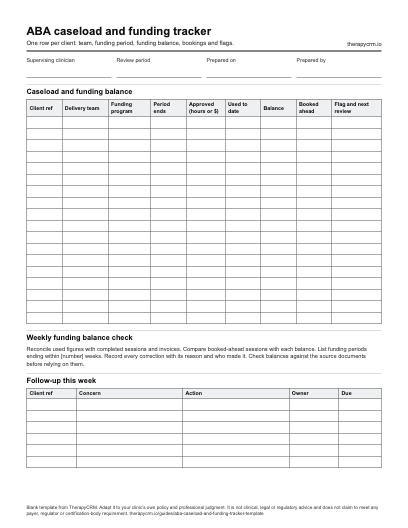
One row per client: team, funding period, funding balance, bookings and flags. The blank PDF prints on US Letter paper (1 page) and the Word document can be edited to match your clinic’s fields. Both are free to download with no sign-up.
What a BCBA caseload tracker should show
A supervising clinician usually carries many clients at once, each with a different team, schedule and funding period. An ABA caseload tracker puts the facts that change what happens next in one place, so a supervisor can see at a glance which clients need attention this week.
The sheet below combines a caseload view with a funding balance view. It leaves out trainee fieldwork hours and any other credential tracking, because those follow a different record and different rules.
- Who the client is, shown as a file number on shared sheets
- Which supervisor and technicians deliver the sessions
- Which funding program pays for the sessions and for what period
- How much funding balance remains, and how many sessions are already booked against it
- When the next plan or funding review is due
- Any flag that needs a supervisor’s attention
Caseload and funding balance columns to copy
These columns work in a paper sheet, a spreadsheet or a software record. The last column says what to check before relying on each number.
| Column | What to record | Check before relying on it |
|---|---|---|
| Client reference | A file number rather than a full name on a shared sheet | Matches the clinic record |
| Delivery team | The supervisor and the technicians assigned | Matches the current schedule |
| Funding program | The program name, or private pay | Matches the family’s funding record |
| Funding period | Start and end dates | Matches the dates the family gave the clinic |
| Approved amount or hours | The figure staff entered for the period | Compared with the source document |
| Used to date | Amount or hours already used | Reconciled with completed, documented sessions and invoices |
| Funding balance | Approved minus used | Recalculated every week; investigate a negative figure |
| Booked ahead | Sessions already scheduled in the period | Compared with the remaining balance |
| Next review | Date of the next plan or funding review | Placed on the supervisor’s calendar |
| Flag | Low balance, period ending, no sessions booked or a data gap | Reviewed at the weekly check |
Why this sheet says funding balance
A sheet built around a payer’s approval for each service does not fit Ontario Autism Program funding. The Ministry describes a yearly funding allocation, set through a determination of needs, that families use to buy eligible services [R1]. The useful number for a clinic is the funding balance inside the funding period: what was allocated, what has been used and what remains.
Two Ministry rules shape the columns. Services bought outside the funding period are ineligible, so the period dates sit beside the balance [R1]. Families with larger allocations receive funding in instalments and must submit an expense form before the next instalment [R1], so a clinic may be asked for the family’s spending to date.
Other payers can run alongside the program. Keep a funding program column, and in a funding balance tracker use a separate row for each program a client is enrolled in so the balances do not mix.
Fictional worked example with a balance check
The balance check compares the share of funding used with the share of the funding period that has passed. A client far ahead of the calendar needs a conversation about the remaining sessions; a client far behind may have a scheduling or attendance gap. The example counts hours. A clinic can track dollars, hours or both, depending on the funding record.
Client B has 6 hours left but 8 booked, so the clinic raises it with the family before those sessions take place. Client C has used little and has nothing booked, so a supervisor asks why. Client A is on track. The figures are invented and carry no clinical or funding meaning.
| Client | Approved hours | Used | Remaining | Booked ahead | Share used | Share of period passed | Flag |
|---|---|---|---|---|---|---|---|
| Client A | 40 | 12 | 28 | 14 | 30% | 38% | On track |
| Client B | 30 | 24 | 6 | 8 | 80% | 50% | Booked hours exceed balance |
| Client C | 50 | 10 | 40 | 0 | 20% | 77% | Little used and none booked |
Share used is used hours divided by approved hours. Share of period passed is weeks passed divided by weeks in the period: 20 of 52, 26 of 52 and 40 of 52.
Weekly funding balance review checklist
Pick a day each week and run the same checks. A short, repeated review catches problems earlier than an occasional long one. The Ministry lists services bought outside the funding period as ineligible, so the check on period dates matters [R1].
- Reconcile used hours or dollars with completed and documented sessions.
- Compare each client’s booked-ahead sessions with the remaining balance.
- List funding periods that end within the next [number] weeks and tell the clinical team.
- Confirm that sessions are not billed against a period they fall outside.
- Record any correction with its reason and the person who made it.
- Flag clients with no sessions booked or no recent session data so a supervisor can follow up.
- Check that what families have been told matches the sheet.
A caseload view for supervising clinicians
Beyond funding, a supervisor often needs a few counts to plan the week. Supervision requirements are set by regulators and funders, and this sheet does not track supervision hours or credentials. Check the Ontario ABA regulation guide and the supervision log for those.
- Clients per supervising clinician
- Sessions per week for each client and team
- Plan review dates coming up
- Clients with data gaps or no recent sessions
How TherapyCRM keeps funding balances
In TherapyCRM, staff enrol a client in a funding program with the approved amount, approved hours and funding period, and keep used and remaining balances on the client record beside the treatment plan and session record. Manual adjustments require a reason and are audited. Staff check each balance against source documents before relying on it.
On an invoice linked to a family-paid funding period, the funded amount cannot go above the period’s remaining approved dollars when an approved amount is recorded. TherapyCRM does not show families a funding balance or hours in the portal or app, so a family update comes from staff.
TherapyCRM serves English-language practices in Canada outside Quebec. It is practice management software with a clinical record, not a physician EMR, and has no EMR certification. It has no telehealth or video visits and does not submit insurance or government claims, including Ontario Autism Program claims.
Check the Ministry pages before you rely on the dates
The Ministry may change the eligible and ineligible lists and the funding rules at its sole discretion [R1]. Read the current pages, ask the family for their funding period dates and use the Ontario Autism Program funding guide for dated sources and what TherapyCRM does and does not do.
Official sources
- [R1] Ontario Ministry of Children, Community and Social Services, Ontario Autism Program guidelines for core clinical services and supports. Page updated September 10, 2026; see ineligible expenses, the determination of needs and funding allocation sections.
- [R2] Ontario Ministry of Children, Community and Social Services, Ontario Autism Program: core clinical services. Page updated March 10, 2026; see Report your expenses.
Frequently asked questions
What should a BCBA caseload tracker include?
At minimum, a client reference, the delivery team, the funding program and period, the approved amount or hours, the amount used, the funding balance, sessions booked ahead, the next review date and a flag column. The blank template has all of these with room for a weekly follow-up list.
How do I work out a funding balance?
Subtract the amount or hours used from the approved figure for the funding period. Take the used figure from completed, documented sessions and invoices, and compare the result with the source document. Treat the balance as a staff-entered figure, not as a funder’s statement.
How often should the tracker be reviewed?
The example uses a weekly check, because balances and bookings change every week. Choose a rhythm the team can keep and use the same checklist each time.
What happens to sessions booked after a funding period ends?
The Ontario Autism Program guidelines list services bought outside the funding period as ineligible [R1]. Raise any booking that would fall after the period with the family before the session takes place.
Does this sheet track supervision hours or credentials?
No. Supervision requirements are set by regulators and funders, and this sheet tracks caseload and funding balance only. Check each clinician’s regulator and the funder for supervision rules.
Do families report their own spending?
Yes. Families report their expenses through their AccessOAP account, or on the Ministry expense form when the Ministry funded them directly [R2]. The clinic’s sheet helps staff answer a family’s questions about the balance; it is not the family’s report.
Does TherapyCRM submit funding reports to AccessOAP?
No. TherapyCRM does not submit claims, expense reports or progress reports to AccessOAP or the Ministry. It keeps the funding figures staff enter, creates invoices and produces summaries a clinic or family can keep.
Does TherapyCRM show families a funding balance?
No. The family portal and the Family app do not show a funding balance or hours, although each invoice shows its own funded amount. Staff share balance updates directly, using the figures on the funding record.