For Canadian practices outside Quebec
Therapy caseload, workload and capacity planning for a clinic team
A client count does not show how a therapy team’s week is spent. This guide helps an ABA, speech-language pathology or occupational therapy clinic record duties, inspect appointment capacity and check a proposed schedule. Use the original blank worksheet alongside the existing browser tools; each answers a different planning question.
Fictional example only. Adapt this to your clinic’s own policy and professional judgment. It is not clinical, legal or regulatory advice and does not claim to meet any payer, regulator or certification-body requirement.
Last checked: 2026-10-10
Download a printable workload and capacity review sheet (PDF or Word)
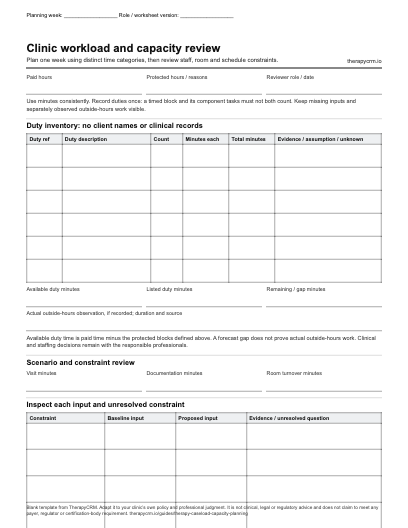
Plan one week using distinct time categories, then review staff, room and schedule constraints. The blank PDF prints on US Letter paper (2 pages) and the Word document can be edited to match your clinic’s fields. Both are free to download with no sign-up.
Choose the question before choosing a planner
Caseload describes assigned clients or visits. Workload includes the time used by sessions and other duties. Appointment capacity asks what could fit with the entered staff and room assumptions; schedule feasibility asks whether specific proposed visits actually fit. Keep those results distinct.
ASHA discusses the difference between caseload and workload in school-based speech-language pathology [CAP-1]. The clinic worksheet below is an original administrative adaptation. It sets no staffing ratio, required productivity rate or safe maximum caseload.
Professional source and scope
- [CAP-1] ASHA: Caseload and Workload. Read 10 October 2026. School-based SLP context; supports distinguishing duties from client counts, not a clinic staffing threshold.
Build a weekly workload inventory
Choose one week and one clinician or role. Record paid hours, protected time, direct sessions, documentation, coordination, preparation and travel. Use minutes for individual duties, then convert totals to hours. A label such as “administration” needs a definition so the same meeting is not counted in two categories.
Record actual outside-hours work separately when it occurred. Planned duties above available time show a planning gap; they do not establish that someone worked unpaid hours. Keep leave and breaks explicit, and ask the team to resolve overlapping records before interpreting totals.
Swipe or scroll sideways to view all table columns.
| Field | What to record | Check before totaling |
|---|---|---|
| Planning period and role | Week, discipline and role reference | Use one period and no client identifiers |
| Paid time and protected blocks | Hours and the reason for each block | Protected time is not available appointment time |
| Duty and duration | Activity, count, minutes per activity or timed block | Do not count both a block and its component tasks |
| Outside-hours observation | Actual duration and context, if recorded | A forecast gap is not an observed shift |
| Evidence and uncertainty | Roster, entered assumption or unknown | A missing value is not zero |
Worked example: eighteen visits do not use the whole week
In this fictional week, one clinician has 35 paid hours. Five hours are protected for breaks, leave and fixed training, leaving 30 hours for the listed duties. Eighteen 45-minute visits use 13.5 hours; their 15-minute documentation allocations use 4.5 hours. Coordination uses 4 hours and preparation/travel uses 2 hours.
The listed duties total 24 hours, leaving 6 hours in the entered plan. Across the whole paid week, 24 duty hours plus 5 protected hours occupy 29 of 35 hours. These are planning allocations, not measured productivity or a recommendation for visit frequency.
Swipe or scroll sideways to view all table columns.
| Category | Calculation | Hours |
|---|---|---|
| Paid time | Entered weekly hours | 35 |
| Protected time | Breaks, leave and fixed training | 5 |
| Available for listed duties | 35 − 5 | 30 |
| Visits | 18 × 45 ÷ 60 | 13.5 |
| Documentation | 18 × 15 ÷ 60 | 4.5 |
| Coordination | Entered block total | 4 |
| Preparation and travel | Entered block total | 2 |
| Remaining in plan | 30 − 24 | 6 |
Test added visits against staff time and eligible rooms
A proposal adds eight visits, each with 45 minutes of treatment and 15 minutes of documentation. That adds 8 duty hours, taking the plan from 24 to 32 hours against 30 available hours: a 2-hour gap. Moving documentation outside the worksheet would hide that gap rather than resolve it.
Suppose only 6 hours of a suitable room are available for these extra visits. With 10 minutes of turnover after each 45-minute visit, the proposal needs 440 room minutes, or 7 hours 20 minutes. Even a simple room ceiling is exceeded. Separate fragmented windows, clinician eligibility and family availability can reduce what fits further.
Use the tools in an explicit sequence
Start with the workload audit to identify duties and overlaps. Carry reviewed staffing and room assumptions into the capacity planner. Then create an appointment proposal and check it for actual conflicts. Finally, compare the confirmed schedule with the plan and note any changed assumptions.
- In the therapist workload audit, enter duties, paid time and any separately observed outside-hours work. Inspect overlap before accepting the total.
- In the clinic capacity planner, enter eligible staff/room pools and turnover. Treat fractional allocation as an optimistic ceiling, not a timetable.
- In the schedule feasibility checker, enter the actual clinician and room windows, protected blocks and proposed requests. Resolve reported conflicts.
- Recheck the chosen week when leave, room availability, service mix or documentation allocations change.
Common mistakes that make capacity look larger
Do not treat every person as eligible for every service or every room as interchangeable. Do not omit turnover, documentation or fixed duties, average away a peak day, or count a cancelled visit as a recovered appointment before an opening is filled.
A pooled weekly ceiling can coexist with an infeasible Tuesday schedule. Compare scenarios using the same period and units; keep unknown inputs visible. In the fictional example, changing the eight added visits to six addresses the simple time ceiling but still requires a specific appointment check. It does not establish clinical suitability.
Turn the result into a team decision
Record the scenario, the constraint, a named role for follow-up and the evidence needed to decide. A coordinator can inspect room windows while a clinical lead reviews service and staffing requirements. If a proposal remains infeasible, record what was left unresolved instead of promising a start date.
Use the blank worksheet for a planning discussion with aggregate business values or fictional references. Public tools process entries in the browser; export if you need to retain the work, and keep identifiable records in the clinic’s approved system.
Swipe or scroll sideways to view all table columns.
| Constraint | Next action | Responsible role | Decision evidence |
|---|---|---|---|
| Two-hour duty gap | Review which entered duties or staffing assumptions can change | Clinical lead | Revised workload inventory |
| Eighty-minute room gap | Inspect an additional suitable room window | Coordinator | Specific room/clinician proposal |
| Client availability unknown | Request logistics through the approved intake process | Intake coordinator | Recorded availability, not a guessed slot |
Connect planning with the clinic workflow
The worksheet helps a team prepare scheduling questions; it does not import a timetable or decide treatment intensity. In a TherapyCRM demonstration, inspect recurring appointments, staff availability, room conflicts, waitlists and coordinator-reviewed family requests using fictional information.
TherapyCRM serves English-language practices in Canada outside Quebec. It does not submit insurance or government claims or provide BACB certification tracking.
Frequently asked questions
How is a caseload different from workload?
Caseload counts assigned clients or visits; workload includes sessions and other duties such as documentation, preparation, coordination and travel. The same client count can create different weekly time demands.
Does this worksheet set a maximum caseload?
No. It organizes entered time and resource assumptions. Clinical, professional and staffing decisions remain with the clinic and the relevant professionals.
Is the capacity planner a scheduling algorithm?
It gives an optimistic ceiling from entered staffing and room assumptions. Use the schedule feasibility checker to inspect a specific proposal; neither result establishes clinical suitability.
Should documentation time be included?
Include the allocation used by your own planning process and identify its source. Keep it separate from direct visits and avoid counting the same block twice.
Does excess planned workload prove outside-hours work?
No. A plan above available time indicates a gap. Outside-hours work needs its own actual observation or record.
Can I save identifiable client records in these public tools?
Use fictional or de-identified references and aggregate business information. Keep identifiable records in a practice-approved system; downloaded files remain under your control.