For Canadian practices outside Quebec
Therapy clinic waitlist management template: sheet, priority rubric and family update
A therapy clinic waitlist management template keeps three things in one place: who is waiting, why each family is ranked where they are, and what the family has been told. Download the blank sheet as a PDF or Word document, then adapt the fictional priority rubric and family update email below. The rubric is an example for the clinic to replace, and nothing on this page predicts a wait time.
Fictional example only. Adapt this to your clinic’s own policy and professional judgment. It is not clinical, legal or regulatory advice and does not claim to meet any payer, regulator or certification-body requirement. The priority bands are invented for illustration and are not a recommended scale.
Last updated: 2026-10-08
Download a printable therapy clinic waitlist management template (PDF or Word)
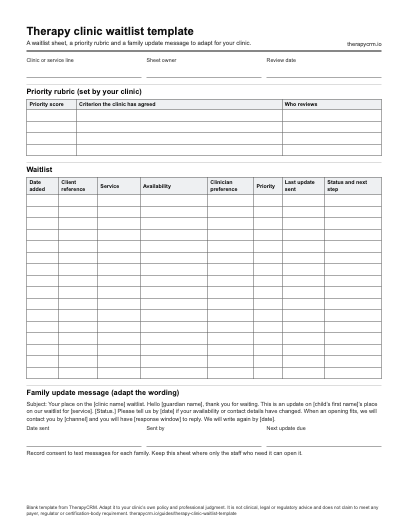
A waitlist sheet, a priority rubric and a family update message to adapt for your clinic. The blank PDF prints on US Letter paper (1 page) and the Word document can be edited to match your clinic’s fields. Both are free to download with no sign-up.
What a therapy clinic waitlist is for
A waitlist is a record of a promise: the clinic has said it will get in touch when it has an opening that fits. A good sheet makes that promise easy to keep. It shows what each family needs, what the clinic has already told them, and who decides which family hears about an opening first.
Whether a clinic has a waitlist at all, and how long it is, depends on the clinic’s capacity. This page does not estimate waiting times for any service or funding program. It covers the record-keeping around the list.
Waitlist sheet fields to copy
These columns are the working core of a waitlist template for a therapy clinic. Add or remove columns to match the services the clinic offers.
| Field | What to record | Why it helps |
|---|---|---|
| Date added | The day the family joined the list | Shows how long each family has been waiting |
| Client reference | A file number or initials rather than a full name on a shared sheet | Keeps a shared or printed sheet low in personal detail |
| Service or discipline | ABA, speech, occupational therapy, physiotherapy or an assessment | Matches families to the right openings |
| Availability | Days and times the family can attend, and any travel limits | Lets staff check a freed slot against the family quickly |
| Clinician preference | A named clinician, or any qualified clinician | Avoids offering a slot the family would refuse |
| Priority | A score from the clinic’s rubric, with the date it was set | Makes the order explainable |
| Contact preference and consent | Email, text or phone, and whether the family agreed to text messages | Prevents messages the family did not agree to |
| Last update sent | Date and channel of the last message to the family | Shows which families are due for an update |
| Status and next step | Waiting, offered, accepted, declined, on hold or closed, plus the next action and its owner | Makes handovers between staff clear |
A waitlist priority rubric the clinic can explain
A priority rubric turns “who goes first” into criteria staff can state out loud. Write each criterion so a family could read it, ask a clinician to review any criterion that rests on clinical need, and leave out anything that has nothing to do with availability, clinical need or time waited. The bands below are an invented example, not a recommended scale.
| Priority score | Example criterion | Who reviews |
|---|---|---|
| 8 to 10 | A clinician has recorded a clinical reason to start earlier, or a transition the clinic can name is approaching | Supervising clinician |
| 5 to 7 | Wide availability that matches many openings, or a long time since the first enquiry | Intake coordinator |
| 2 to 4 | Narrow availability that matches few openings | Intake coordinator |
| 0 to 1 | New entry awaiting review, or a family who asked the clinic to hold their place | Intake coordinator |
Fictional example: three waitlist entries
The three entries use the invented rubric above. Because Client C scores highest, the clinic asks a clinician to review the entry before any offer. Client A would hear about the next opening that fits both the afternoon availability and the service. Client B waits for the named clinician.
| Client reference | Service | Availability | Priority | Next step |
|---|---|---|---|---|
| Client A | Speech therapy | Weekday afternoons; any clinician | 6 | Offer the next fitting opening; update due [date] |
| Client B | Occupational therapy | Mondays and Thursdays before noon; one named clinician | 3 | Check the clinician’s next opening; update due [date] |
| Client C | ABA intake | Weekday mornings | 8 | Clinician reviews urgency before any offer |
The clients, priorities and availability are invented, not a benchmark or a recommended order.
Family update email to copy and adapt
A short, regular update is easier to keep up than a long, occasional one. Say what you know, what you need from the family and when they will hear next. Do not promise a start date unless the clinic can keep it.
| Part | Wording to adapt |
|---|---|
| Subject line | Your place on the [clinic name] waitlist |
| Opening | Hello [guardian name], thank you for waiting. This is an update on [child’s first name]’s place on our waitlist for [service]. |
| Status | [Child’s first name] is on our waitlist for [service]. We do not have an opening that fits yet. |
| What we need from you | Please tell us by [date] if your availability, contact details or service needs have changed. |
| How we will contact you | When an opening fits, we will contact you by [channel]. You will have [response window] to reply before we offer it to the next family. |
| Next update | We will write again by [date]. You can reach us at [clinic contact method]. |
Offer an opening and record the answer
When a visit is freed, the same steps keep the process fair and leave a record. Use the same response window for every family so the order stays consistent.
- Pick the families whose service, availability and clinician preference fit the opening, then order them by the rubric.
- Contact the first family and say how long the offer stays open.
- Record the date, channel and answer on the sheet before moving to the next family.
- When a family accepts, book the visit, then close or update their entry.
- When a family declines, record whether they stay on the list and whether their availability changed.
- If nobody accepts within the window, note the outcome and keep the opening in the usual booking process.
Review the waitlist on a schedule
Pick a review rhythm the clinic can keep, for example a monthly pass through every entry. Close entries that have been filled, check that availability and contact details are current, and confirm that families who agreed to text messages still have that preference recorded.
A waitlist sheet holds personal information about children and families. Store it where only the staff who need it can open it, and follow the clinic’s own privacy policy for how long closed entries are kept.
How the TherapyCRM waitlist works
In TherapyCRM, staff add a waitlist entry for an active client with an optional clinician, an optional therapy type, preferred days, a preferred time window, a priority from 0 to 10 and free-text notes. An entry stays active until staff mark it fulfilled or cancelled. Adding an entry can email the client a confirmation, depending on the practice’s email settings.
When a scheduled visit is cancelled, TherapyCRM looks for active entries that match the freed slot by clinician, therapy type, day and time window. It notifies up to five matching entries, highest priority first and oldest entry first among equals, by email and, where the family has consented, by text message. The message tells the family how long they have to respond, 24 hours, and staff see an in-app notice with the count only. The notice does not book the visit; the clinic does.
The priority number and the criteria behind it are the clinic’s own, and TherapyCRM does not set them. Staff also add and update entries themselves.
TherapyCRM serves English-language practices in Canada outside Quebec. It is practice management software with a clinical record, not a physician EMR, and has no EMR certification. It has no telehealth or video visits and does not submit insurance or government claims, including Ontario Autism Program claims.
Frequently asked questions
What is a therapy clinic waitlist management template?
It is a sheet and a set of messages for tracking families who are waiting for an opening: who they are, what they need, how they are ranked and what the clinic last told them. The downloadable template has a waitlist sheet, a blank priority rubric and a family update message.
How should a clinic decide who is first on the waitlist?
Use written criteria the clinic can explain to a family, ask a clinician to review any criterion based on clinical need, and apply the criteria the same way every time. The rubric on this page is an invented example for the clinic to replace.
How often should a clinic update families on the waitlist?
This page gives no required frequency. Choose a schedule the clinic can keep, such as a regular check-in, and say in each message when the next update will come.
Should the clinic tell families how long the wait will be?
Only if the clinic can stand behind the estimate. This page makes no wait-time estimate for any service or funding program, and a start date should be promised only when the clinic can keep it.
What happens in TherapyCRM when a visit is cancelled?
TherapyCRM matches the freed slot against active waitlist entries by clinician, therapy type, day and time window, then notifies up to five matching entries, highest priority first. The families have 24 hours to respond, and the clinic books the visit.
Does TherapyCRM book the freed slot automatically?
No. The notification tells matching families that a slot opened and how long they have to respond. A staff member books the visit.
Do waitlist text messages go to every family?
No. In TherapyCRM, text messages go only where the family has consented to them. Record each family’s contact preference and consent on the sheet so staff know which channel to use.
What personal information belongs on a waitlist sheet?
Only what staff need to match and contact families, such as a client reference, service, availability and contact preference. Keep the sheet where only the people who need it can open it, and follow the clinic’s own privacy policy.