For Canadian practices outside Quebec
Therapy documentation audit checklist and SOP workflow worksheet
A documentation audit checklist is useful when reviewers agree what each item means and can show what remains unreviewed. This original worksheet organizes a clinic-defined review cycle for ABA, speech-language pathology and occupational therapy records. It supports follow-up; it does not certify a chart, clinical quality or compliance.
Fictional example only. Adapt this to your clinic’s own policy and professional judgment. It is not clinical, legal or regulatory advice and does not claim to meet any payer, regulator or certification-body requirement.
Last checked: 2026-10-10
Download a printable documentation review and SOP worksheet (PDF or Word)
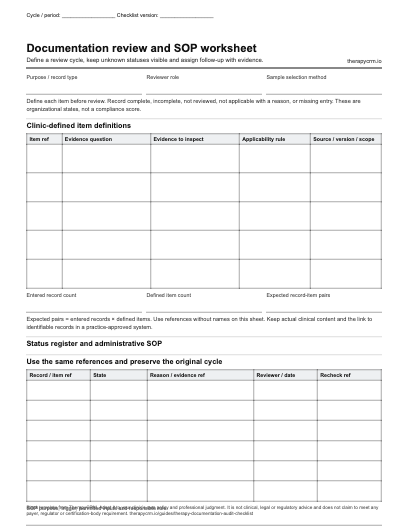
Define a review cycle, keep unknown statuses visible and assign follow-up with evidence. The blank PDF prints on US Letter paper (2 pages) and the Word document can be edited to match your clinic’s fields. Both are free to download with no sign-up.
Define the review before opening records
Choose the purpose, period, sample-selection method, record types and reviewer roles. Write the checklist version and cycle reference before review starts. A team might inspect whether a note is linked to the intended session and plan, who reviewed it, and whether follow-up is assigned.
Record standards vary by profession and jurisdiction. COTO’s Ontario OT record-keeping standard is one primary reference [DOC-1], not a checklist for every discipline. Use the existing compliance guides and your professionals to decide which sources apply; this resource does not set retention periods, payer requirements or correction rules.
Professional source and scope
- [DOC-1] COTO: Standard for Record Keeping, 2023. Read 10 October 2026. Ontario OT source for a clinician’s review of record practices; this worksheet does not reproduce its standard or apply it to other professions.
Author items that a reviewer can answer consistently
Give each item a stable reference, a plain definition, the evidence to inspect and an applicability rule. A yes/no label alone hides whether the reviewer had enough evidence. Keep clinical interpretation with a qualified reviewer and administrative follow-up with an assigned role.
Swipe or scroll sideways to view all table columns.
| Item | Evidence question | Scope note |
|---|---|---|
| REV-01 | Does the session reference match the reviewed record? | Compare references within the approved system |
| REV-02 | Can the reviewer identify the related plan version? | Linkage check, not a judgment of treatment |
| REV-03 | Is the author/review status identifiable? | Use the clinic’s defined workflow |
| REV-04 | Is a proposed family-facing update separately reviewed? | May be not applicable with a recorded reason |
| REV-05 | Is unresolved follow-up assigned and dated? | A closure needs its own verification |
Keep review states distinct
Use complete when the defined evidence supports completion, and incomplete when a reviewed applicable item lacks something required by the clinic’s definition. Use not reviewed when no decision has been made. A missing entry means the result was not recorded; it is not the same as an incomplete finding. Record a reason when an item is not applicable.
Do not silently remove a difficult item from the denominator or overwrite an earlier review cycle. The browser documentation review tracker keeps version/cycle-specific entries and exposes missing pairs separately. A status count describes the entered sample, not the clinic’s entire record population.
Worked example: three fictional records and fifteen pairs
A clinic chooses three fictional records, DEMO-A, DEMO-B and DEMO-C, and the five items above: 3 × 5 = 15 expected record-item pairs. The table records every result. N/A means not applicable with a reason; NR means not reviewed. “Missing” is an unentered result.
- Counts: 10 complete, 1 incomplete, 2 not reviewed, 1 missing and 1 not applicable: all 15 pairs accounted for.
- Twelve pairs have a reviewed decision: 10 complete + 1 incomplete + 1 not applicable. Three still lack a recorded decision.
- The sample does not establish population compliance. A fraction calculated only from reviewed applicable pairs would hide the not-reviewed and missing work unless those counts remain visible.
Swipe or scroll sideways to view all table columns.
| Record | REV-01 | REV-02 | REV-03 | REV-04 | REV-05 |
|---|---|---|---|---|---|
| DEMO-A | Complete | Complete | Complete | Complete | Complete |
| DEMO-B | Complete | Complete | Complete | Incomplete | NR |
| DEMO-C | Complete | Complete | Missing | N/A: no update planned | NR |
Assign findings and verify closure
For DEMO-B, REV-04 is incomplete because a draft update has no recorded reviewer decision under the fictional clinic’s process. Assign a clinical lead to inspect the draft and record the decision through the approved workflow. REV-05 remains not reviewed until that follow-up has been checked.
For DEMO-C, ask the reviewer whether REV-03 was checked; leave the missing entry visible until a result is actually recorded. Preserve the first-cycle matrix and open a recheck entry linked to the same item. Follow-up completed and evidence rechecked are distinct events.
Swipe or scroll sideways to view all table columns.
| Finding | Action | Owner role | Evidence and closure |
|---|---|---|---|
| DEMO-B / REV-04 | Review the proposed update | Clinical lead | Draft reference and dated decision |
| DEMO-C / REV-03 | Resolve the missing review entry | Assigned reviewer | Recorded result or still not reviewed |
| Cycle recheck | Verify both actions and unresolved REV-05 items | Review coordinator | Linked recheck results; no silent overwrite |
Write a small SOP around the handoff
An SOP explains a repeatable administrative workflow. Define a trigger, permitted inputs, who performs the steps, what evidence demonstrates completion and who handles an exception. Give the document a version and a review owner. The blank second page provides these fields without filling in legal or clinical requirements.
Fictional SOP: after a weekly review closes, the coordinator lists unresolved item references, assigns the responsible role, records the intended follow-up date and schedules a recheck. If an issue concerns clinical judgment or privacy, the coordinator routes it through the clinic’s established professional or incident procedure rather than deciding it from this worksheet.
- Select the review cycle and preserve its original findings.
- Assign each action, due date and evidence reference.
- Record what the responsible person completed.
- Have the authorized reviewer verify the evidence.
- Close or carry forward the finding with a dated reason.
Common mistakes in documentation audits
Avoid scoring unknowns as complete, deleting not-applicable items without reasons, changing item definitions midway through a cycle, or presenting a convenience sample as a statistically representative audit. A complete signature field does not validate clinical content.
Do not paste clinical notes into a public worksheet or send findings through an unapproved channel. Use fictional references in browser demonstrations and keep actual review evidence in the practice-approved system. A clinical incident or privacy concern should follow the clinic’s existing escalation process.
Connect the review to training and workflow
Use recurring findings to choose a specific training exercise, such as locating the correct plan version in a fictional session or showing how a draft reaches its reviewer. Recheck that task in the next cycle rather than treating attendance at training as proof of competency.
TherapyCRM connects session records, plans and SOAP-style progress notes with review workflows. The public checklist remains an organizational aid. TherapyCRM serves English-language practices in Canada outside Quebec. It does not submit insurance or government claims or provide BACB certification tracking.
Frequently asked questions
Does this audit checklist establish compliance?
No. It organizes a clinic-defined sample, evidence and follow-up. Professional, funder and legal requirements need their own review.
What is the difference between incomplete and not reviewed?
Incomplete is a decision about a reviewed applicable item. Not reviewed means no decision was made; a missing entry means the result was not recorded.
How should not-applicable items be handled?
Record the reason and keep the item visible in the cycle. Do not remove it silently or treat it as proof of completion.
Can I change items during a review?
Keep the original version and identify a new version or cycle for changed definitions. Otherwise results from different rules can appear comparable.
What belongs in the SOP worksheet?
Purpose, trigger, inputs, role ownership, ordered steps, completion evidence, exception route and review/version details. The clinic supplies its own requirements.
Should patient notes be copied into the public tracker?
No. Use fictional or de-identified references. Keep identifiable records and the links to actual evidence in a practice-approved system.