For Canadian practices outside Quebec
ABA duration and latency data sheets with worked examples
A duration data sheet records how long an observed event lasts. A latency data sheet records elapsed time from a defined cue to the beginning of a defined response. This two-sheet pack keeps those questions separate and shows what to write when timing is incomplete or no response is observed.
Fictional example only. Adapt this to your clinic’s own policy and professional judgment. It is not clinical, legal or regulatory advice and does not claim to meet any payer, regulator or certification-body requirement.
Last checked: 2026-10-10
Download a printable duration and latency record pack (PDF or Word)
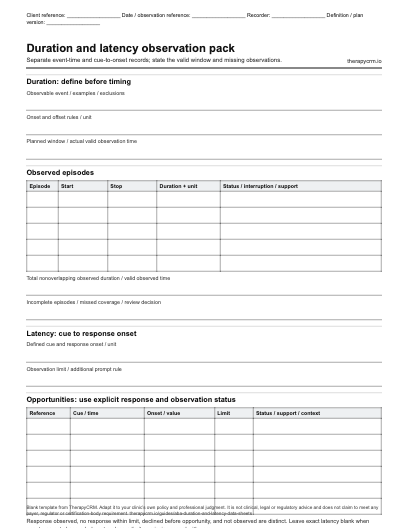
Separate event-time and cue-to-onset records; state the valid window and missing observations. The blank PDF prints on US Letter paper (2 pages) and the Word document can be edited to match your clinic’s fields. Both are free to download with no sign-up.
Choose duration or latency before starting the timer
Duration and latency can both use seconds, but their start points differ. Duration starts with the event and ends with its offset. Latency starts with the agreed cue and ends at response onset. IRIS describes this distinction and the need for an observable definition [TIM1].
Choose a meaningful participation question with the learner and clinician. Time alone does not indicate willingness, quality of life or a need to reduce a behaviour. In the fictional examples, the record describes voluntary engagement with a chosen activity and the start of a chosen routine; it sets no acceptable time or treatment goal.
Swipe or scroll sideways to view all table columns.
| Method | Start | Stop | Keep alongside the value |
|---|---|---|---|
| Duration | Defined event begins | Defined event ends | Valid observation time; interruption; definition version |
| Latency | Defined cue has finished | Defined response begins | Cue wording; observation limit; support; response status |
Set up and complete the blank timing sheets
Write the definition and observation rules before the visit. The downloadable pack has separate duration and latency pages so a recorder cannot accidentally put a wait time into an event-duration column.
- Record the reference, date, recorder, routine, definition version and unit; use the same unit throughout one series.
- State observable start and stop examples, plus what does not count. State whether separate episodes may overlap and how an interruption is handled.
- Record the actual observed window. For latency, state the observation limit and whether a later prompt changes the opportunity’s status.
- Start and stop the timer at the defined events. Record each episode or opportunity promptly, with the support and participation context.
- Mark a missed or incomplete timing explicitly. Record a declined activity separately; follow the approved participation and stop plan.
- Check the source rows, calculate only comparable observed values, disclose exclusions and send the summary for clinician review.
Completed duration data sheet: fictional engagement episodes
Client D chooses a drawing activity. The fictional definition counts time making marks with the drawing materials; it excludes choosing colours and breaks. An observer watches the entire 10-minute window from 09:00 to 09:10. The following are all observed episodes, using seconds and definition D1.
Swipe or scroll sideways to view all table columns.
| Episode | Start | Stop | Duration | Status and context |
|---|---|---|---|---|
| 1 | 09:00:30 | 09:02:00 | 90 seconds | Observed; materials selected by client |
| 2 | 09:03:00 | 09:04:00 | 60 seconds | Observed; after a chosen break |
| 3 | 09:06:00 | 09:07:30 | 90 seconds | Observed; same activity and definition |
| Summary | 09:00:00 | 09:10:00 | 240 of 600 observed seconds | 40% of valid observed time; three episodes |
240 ÷ 600 × 100 = 40%. Mean episode duration is 240 ÷ 3 = 80 seconds. All entries are fictional.
Completed latency sheet: response, no response and missing timing
For fictional definition L1, the cue ends when the staff member finishes saying “Your drawing materials are ready”; the response starts when Client D touches the selected drawing material. The illustration uses a 20-second observation limit chosen only for the example. A reminder is support and stays visible.
Swipe or scroll sideways to view all table columns.
| Opportunity | Cue time | Response/time | Status | Support or coverage note |
|---|---|---|---|---|
| 1 | 10:00:00 | 10:00:04 / 4 seconds | Response observed | No additional prompt |
| 2 | 10:05:00 | 10:05:09 / 9 seconds | Response observed | Gestural reminder at 6 seconds |
| 3 | 10:10:00 | No onset within 20 seconds | No response within limit | Full limit observed; no exact latency |
| 4 | 10:15:00 | Unknown | Not observed | Recorder interrupted; no timing entered |
Two response latencies, one fully observed no-response opportunity and one missing record. Do not enter 20 or 0 as the exact latency for opportunity 3.
Calculate and graph timing without hiding missing observations
The mean of the two observed response latencies is (4 + 9) ÷ 2 = 6.5 seconds. Report it as a mean among observed responses with both prompt contexts shown. It excludes one observed no-response opportunity and one missed observation; it is not the mean across all four planned opportunities. A no-response limit is a bounded observation, not a measured response time.
For duration, divide total nonoverlapping event time by valid observed time when reporting a percentage. If the observer misses part of the window, report that coverage and do not treat the unknown segment as no event. An episode continuing past the observation end is incomplete; do not label its observed portion the complete episode duration.
Common mistakes are mixing minutes and seconds, changing the onset definition mid-series, counting two overlapping episodes twice, and putting zeros in blank rows. Keep definition versions or different prompt contexts separate on a graph. A pattern in a chart still needs clinical interpretation.
For an Excel or practice-approved Google Sheets workflow, download the latency recorder’s blank or source CSV, or the data grapher’s duration CSV. Import the header and rows together; retain the definition, unit, observation limit, coverage and support in your record. Verify the imported preview and keep no-response and missing states intact. The printable PDF and Word pack is separate from these CSV exports.
Use the sheet, tools and clinical record together
Use fictional or deidentified information in the public tools. Keep identifiable observations and completed forms in the practice-approved clinical record under the clinic’s access, retention and amendment policies.
A public worksheet helps prepare and inspect a recording format. It does not authorize a treatment, decide mastery, replace consent or turn a draft into a reviewed clinical record. A clinician should confirm definitions, denominators and interpretation before the team uses the form.
TherapyCRM serves English-language practices in Canada outside Quebec. It is practice management software with a clinical record, not a physician EMR, and has no EMR certification. It has no telehealth or video visits and does not submit insurance or government claims, including Ontario Autism Program claims.
Sources and scope of this original resource
The blank record and every worked entry are original TherapyCRM examples. Sources explain the professional topic; they do not endorse this template. School resources and research studies require interpretation by a qualified clinician for a real clinic. No standardized assessment, publisher form or licensed guideline is reproduced.
Source references
- [TIM1] IRIS: Duration and Latency Recording. Educational definitions of duration, latency and observation rules. Checked 10 October 2026. Linked as background; no IRIS form or example is reproduced.
- [MEA1] IRIS: Measuring Behavior. Educational discussion of operational definitions, observation methods, scatterplot recording and graphing. Checked 10 October 2026; school examples do not establish Canadian clinic requirements.
Frequently asked questions
What is the difference between duration and latency?
Duration measures event onset to event offset. Latency measures a defined cue to response onset. Both need explicit timing rules and units.
Should a no-response latency be recorded as zero?
No. Record no response within the observation limit, with that limit stated. Zero is an observed immediate onset, not an absent response or missing observation.
How is percentage duration calculated?
Divide the total nonoverlapping observed event time by valid observed time and multiply by 100. Use the same unit, and show incomplete observation coverage.
Can I average a no-response limit with timed responses?
Do not treat an observation limit as an exact response latency. Report observed response times and no-response opportunities separately, with the analysis rule chosen by the clinician.
Can the duration sheet be used for transitions or participation?
A clinician can adapt its definition and context to a meaningful individual question. The form does not select a goal, acceptable time or intervention.
Are editable and printable versions available?
The original blank pack has a printable PDF and an editable Word version. It is a documentation layout, not an assessment or required submission form.