For Canadian practices outside Quebec
Track referral sources in a therapy practice: a log template
Track referral sources in a therapy practice by recording, for every new enquiry, who referred the family, when the enquiry arrived and what happened next. The fictional referral source tracking log and blank columns below help an owner or coordinator see which channels lead to booked intakes, using client references instead of names.
Fictional example only. Adapt this to your clinic’s own policy and professional judgment. It is not clinical, legal or regulatory advice and does not claim to meet any payer, regulator or certification-body requirement. The log holds no client names and no clinical details.
Last updated: 2026-10-08
Download a printable referral source tracking log (PDF or Word)
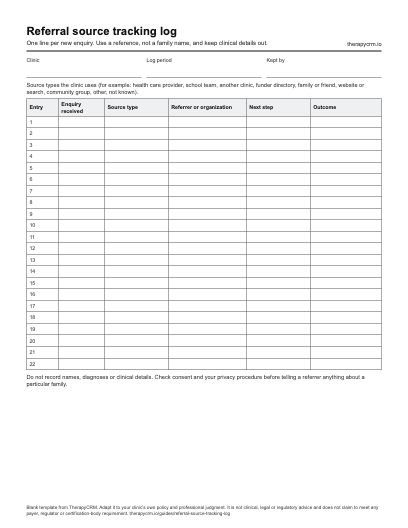
One line per new enquiry. Use a reference, not a family name, and keep clinical details out. The blank PDF prints on US Letter paper (1 page) and the Word document can be edited to match your clinic’s fields. Both are free to download with no sign-up.
Why a therapy practice tracks referral sources
Families reach a therapy practice through doctors, schools, other clinics, friends, search and community groups. Without a record, a clinic remembers the memorable referrals and forgets the rest. A simple log shows where enquiries come from, how many become booked intakes and where families drop out.
It also gives the owner a factual basis for conversations with referrers, such as confirming that a referral arrived. Check consent and privacy rules before sharing anything about a particular family.
Fictional referral source log
The sources, referrers and outcomes below are invented. Each entry uses a reference instead of a family name, and the weeks count from the start of the log.
| Entry | Source type | Referrer (fictional) | Enquiry received | Next step and outcome |
|---|---|---|---|---|
| E-01 | Family doctor | Referrer A, a family medicine office | Week 1 | Intake booked; first visit held in week 3 |
| E-02 | School team | Referrer B, a school learning-support team | Week 1 | Waitlisted; family told how the clinic will update them |
| E-03 | Family or friend | A current client family | Week 2 | Intake booked |
| E-04 | Website or search | Family’s words: “found you online” | Week 2 | No reply after two contact attempts; entry closed in week 4 |
| E-05 | Another clinic | Referrer C, a pediatric therapy clinic | Week 3 | Not a fit for the services requested; family pointed to a service that fits |
| E-06 | Community group | Referrer D, a parent support group | Week 4 | Intake booked after the family chose a different first time |
All entries are fictional. Source types and outcomes are examples, not categories a clinic must use.
Blank referral source tracking log to copy
Copy these columns into a spreadsheet, or use the printable one-page log and editable Word file in the download section.
| Column | What to record |
|---|---|
| Entry reference | [A reference that does not reveal the family’s name] |
| Enquiry received | [Date or week the enquiry arrived] |
| Source type | [One category from the clinic’s short list] |
| Referrer or organization | [The person or organization the family names, if any] |
| How the family heard of the clinic | [The family’s own words] |
| Service requested | [Discipline or program asked for] |
| Contact attempts | [Number of attempts and when the last one was made] |
| Outcome | [Intake booked, waitlisted, not a fit, declined or no reply] |
| Reason or note | [Why that outcome, without clinical details] |
| Referrer update | [Whether an update was sent, and the consent that allowed it] |
Choosing source categories
Keep the list short enough that staff pick the same category for the same situation. The list below is a starting set for a clinic to adapt.
Ask every family how they heard about the clinic and write down their words, then choose the category afterwards. Record the person who made the referral separately from the channel the family used to find the clinic’s contact details.
- Health care provider, such as a family doctor, nurse practitioner or specialist.
- School or school board team.
- Another therapy clinic or agency.
- Funder or program directory.
- Family or friend.
- Website or search.
- Community group or event.
- Other (describe) and Not known.
Reading the log: what to count
At the end of each review period, count enquiries by source type and by outcome. The share of booked intakes for a source is its booked entries divided by its enquiries. For example, a source with 4 enquiries and 3 booked intakes is 3 ÷ 4 = 75 percent, but four enquiries are too few to compare that source with another.
In the fictional log above, every source type has a single enquiry, so no comparison is possible. Use the log to ask questions and to notice changes over time, and wait until the counts are large enough before changing how the clinic works.
Privacy and what to keep out of the log
The log is about the route to the clinic, not about the child.
- Do not record diagnoses, concerns or other clinical details.
- Use a reference rather than a name, and keep the key that links references to families in the client record, not in the log.
- Limit who can open the log to the staff who handle enquiries and the owner.
- Check the family’s consent and the clinic’s privacy procedure before telling a referrer anything about a particular family, including whether the family booked.
- A regulator’s advertising and fee standards may limit what a clinic can offer a referrer. Check each clinician’s regulator before offering a gift or payment for referrals.
How TherapyCRM records lead source
In TherapyCRM, each lead record has a lead source field, chosen from the practice’s list of lead sources. The lead list, the pipeline and the lead detail show it. The Analytics tab of the Leads page also has a lead source performance panel that shows, for each recorded source, the number of leads, how many converted, the conversion rate and the average lead score.
The panel groups leads by the source recorded on each lead. It does not replace a log of individual referrers or of the family’s own words, so a clinic may keep both. TherapyCRM serves English-language practices in Canada outside Quebec.
Adapt the log to your clinic
Replace the categories, remove columns the clinic will not use and decide who owns the log. Review it on a schedule the clinic chooses, and keep entries consistent. Nothing on this page is legal, privacy or tax advice.
Frequently asked questions
How do I track referral sources in a therapy practice?
Ask each new family how they heard about the clinic, record the answer under a reference instead of a name, choose a source category and note the outcome. Review the counts on a schedule the clinic chooses.
What should a referral source tracking log include?
An entry reference, the enquiry date, the source type, the referrer or organization, how the family heard of the clinic, the service requested, contact attempts and the outcome. Leave out clinical details.
Should the log record referrers’ names?
Record the person or organization the family names if the clinic wants to follow up with referrers. Keep family details out of the log, and check consent before telling a referrer anything about a particular family.
How often should a clinic review its referral sources?
This page sets no required schedule. A clinic might review monthly or each term, and wait until counts are large enough to compare sources before changing how it works.
Can I tell a referrer that their referral booked?
Check the family’s consent and the clinic’s privacy procedure first. The compliance pages link each province’s privacy rules to their official sources.
Does TherapyCRM track lead sources?
Yes. Each lead has a lead source field, and the Analytics tab of the Leads page has a lead source performance panel with lead counts, conversions and average score by source. It reports on the source recorded for each lead.
Can I download a blank referral source tracking log?
Yes. The PDF prints on US Letter paper and the Word document can be edited to match the clinic’s fields. Both are free to download with no sign-up and contain no client data.